
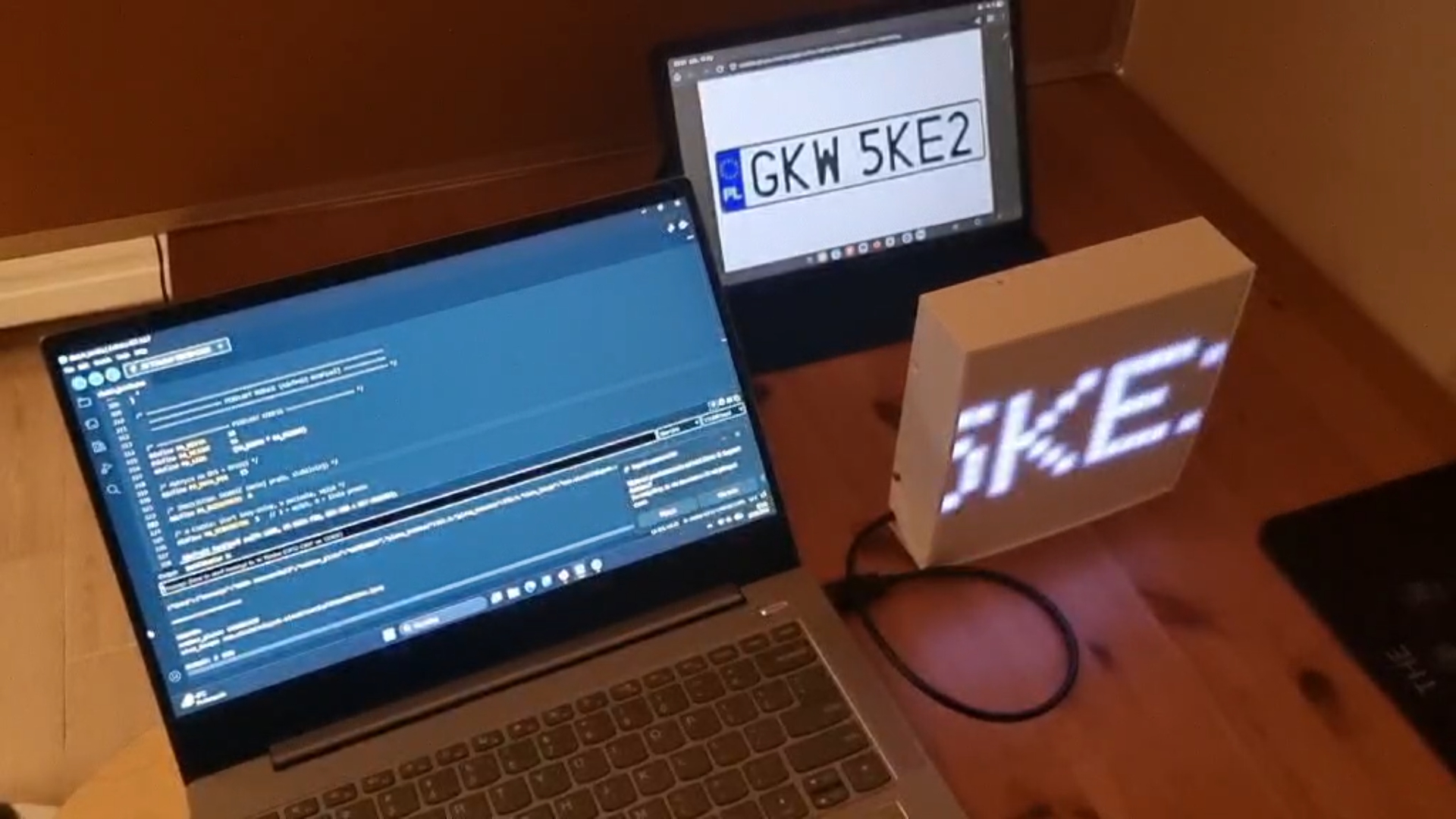
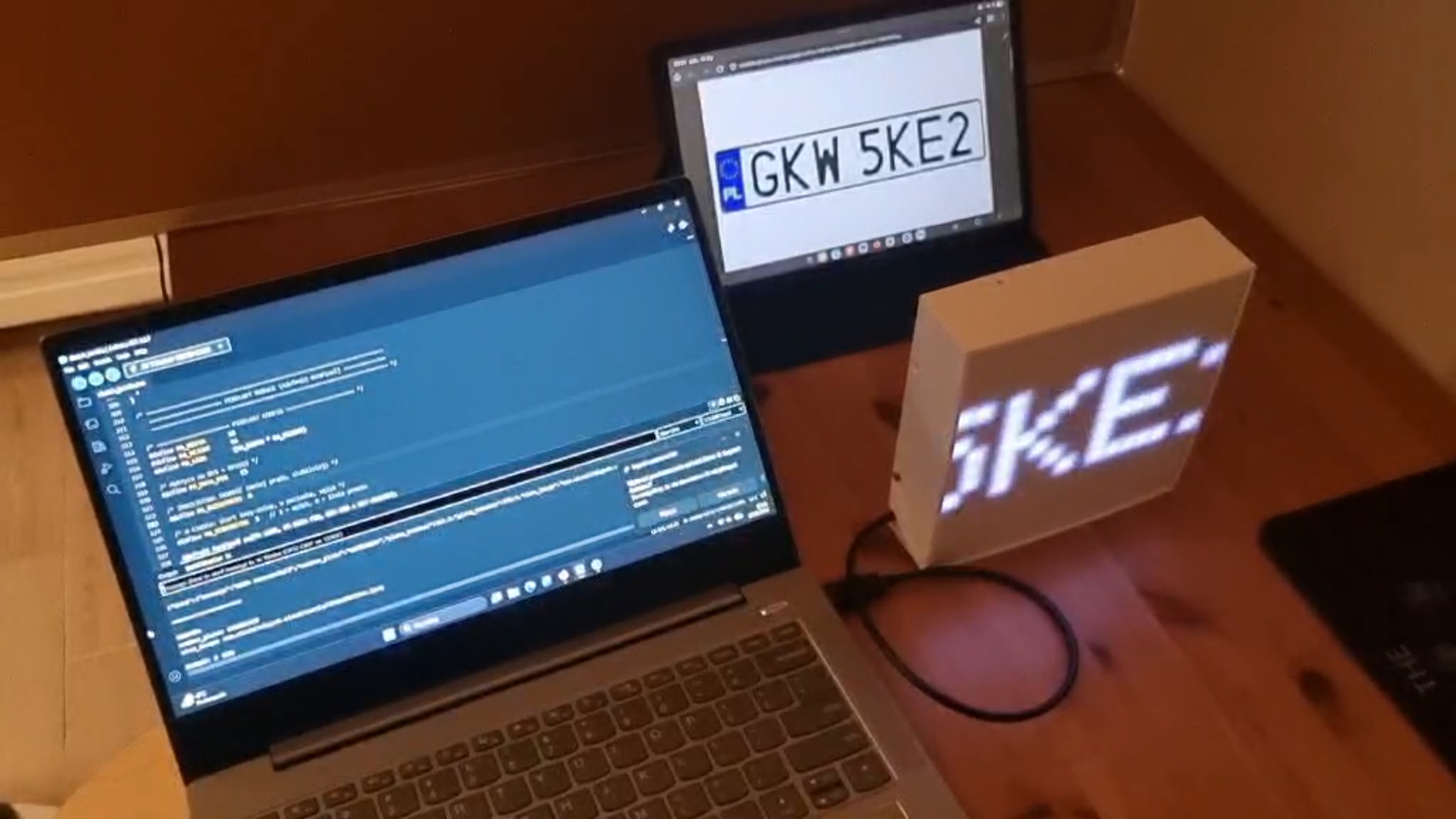
Projekt polega na zaprogramowaniu i uruchomieniu wizyjnego czytnika samochodowych tablic rejestracyjnych. System bazuje na mikrokontrolerze esp32 z dedykowaną do niego kamerą esp-cam. Cały ten zestaw umieszczony jest wewnątrz drukowanej obudowy, która zawiera również matryce LED RGB 16x16, który służy do wyświetlania odczytanych wartości. Zasada działania programu jest dosyć kompleksowa i wykorzystuje wszystkie nauczone na zajęciach moduły:
1. Obraz z kamery jest przechwytywany i przechowywany w pamięci tymczasowej kontrolera.
2. Poprzez połączenie z Internetem przez Wi-Fi kontroler przesyła zdjęcie do specjalnego API, na którym wykonywana jest procedura widzenia maszynowego.
3. Jeżeli API rozpozna jakąś tablicę rejestracyjną na wysłanej klatce to zwraca odczytane numery na kontroler.
4. Numery odczytane z tablicy są następnie wyświetlane w postaci scrolla na załączonej matrycy LED.
1. mikrokontroler esp32
2. kamera esp-cam
3. ekran - matryca 16 x 16 LED
1. Komputer z dostępem do internetu
2. Klucze do używanego API ( wymagające rejestracji na stronie)
Projekt polega na zaprogramowaniu oraz uruchomieniu wizyjnego systemu automatycznego odczytu samochodowych tablic rejestracyjnych (ANPR – Automatic Number Plate Recognition). System został zrealizowany w oparciu o mikrokontroler ESP32 współpracujący z dedykowanym modułem kamery ESP32-CAM, co pozwala na przechwytywanie obrazu w czasie rzeczywistym oraz jego dalsze przetwarzanie. Cały układ elektroniczny został umieszczony w zaprojektowanej i wydrukowanej w technologii druku 3D obudowie, która integruje wszystkie elementy systemu i zapewnia ich ochronę mechaniczną oraz estetyczny wygląd.
Dodatkowym elementem systemu jest kolorowa matryca LED RGB o rozdzielczości 16×16 pikseli, służąca do wizualnej prezentacji wyników działania algorytmu. Matryca ta umożliwia dynamiczne wyświetlanie odczytanych numerów rejestracyjnych w postaci przewijanego tekstu (scrolla), co zwiększa czytelność prezentowanych danych oraz atrakcyjność wizualną projektu.
Warstwa hardware jest bardzo prosta - korzysta się z gotowego modułu integrującego mikrokontroler, kamerę oraz matrycę LED.
Zasada działania programu jest złożona i obejmuje wykorzystanie wielu zagadnień oraz modułów poznanych w trakcie zajęć, takich jak obsługa peryferiów mikrokontrolera, komunikacja sieciowa, praca z pamięcią, integracja z zewnętrznymi usługami API oraz podstawy widzenia maszynowego.
W pierwszym etapie działania systemu obraz z kamery ESP32-CAM jest przechwytywany i zapisywany w pamięci tymczasowej mikrokontrolera. Następnie, przy wykorzystaniu połączenia bezprzewodowego Wi-Fi, zapisany obraz jest przesyłany do zewnętrznego serwera API, na którym realizowane są zaawansowane algorytmy analizy obrazu oraz rozpoznawania znaków.
Po stronie API wykonywana jest procedura widzenia maszynowego, polegająca na wykryciu tablicy rejestracyjnej w przesłanej klatce oraz rozpoznaniu znajdujących się na niej znaków alfanumerycznych. W przypadku poprawnego rozpoznania tablicy, serwer zwraca do mikrokontrolera ciąg znaków odpowiadający numerowi rejestracyjnemu pojazdu.
W kolejnym etapie otrzymane dane są przetwarzane przez program sterujący mikrokontrolera i wyświetlane na matrycy LED RGB w formie animowanego przewijania tekstu. Cały proces odbywa się automatycznie i może być cyklicznie powtarzany, co umożliwia ciągłe monitorowanie pojawiających się pojazdów. Projekt stanowi praktyczne połączenie systemów wbudowanych, komunikacji sieciowej oraz elementów sztucznej inteligencji i widzenia komputerowego, demonstrując zastosowanie nowoczesnych technologii w rzeczywistym problemie inżynierskim.
/*
ESP32-CAM Vehicle Number Plate Recognition (Serial-only)
Control via Serial Monitor:
c -> capture + upload + print result
i -> info
r -> reboot
*/
#include <Arduino.h>
#include <WiFi.h>
#include <WiFiClientSecure.h>
#include "soc/soc.h"
#include "soc/rtc_cntl_reg.h"
#include "esp_camera.h"
/* ===================== PIXELART (Adafruit NeoPixel) ===================== */
#include <Adafruit_NeoPixel.h>
/* ===================== USER CONFIG ===================== */
const char* ssid = "nazwa sieci";
const char* password = "hasło do sieci";
String serverName = "www.circuitdigest.cloud";
String serverPath = "/readnumberplate";
const int serverPort = 443;
String apiKey = "R2vbeKKtLXxx";
/* ===================== CAMERA PINS (AI THINKER) ===================== */
#define PWDN_GPIO_NUM 32
#define RESET_GPIO_NUM -1
#define XCLK_GPIO_NUM 0
#define SIOD_GPIO_NUM 26
#define SIOC_GPIO_NUM 27
#define Y9_GPIO_NUM 35
#define Y8_GPIO_NUM 34
#define Y7_GPIO_NUM 39
#define Y6_GPIO_NUM 36
#define Y5_GPIO_NUM 21
#define Y4_GPIO_NUM 19
#define Y3_GPIO_NUM 18
#define Y2_GPIO_NUM 5
#define VSYNC_GPIO_NUM 25
#define HREF_GPIO_NUM 23
#define PCLK_GPIO_NUM 22
int count = 0;
WiFiClientSecure client;
/* ===================== PIXELART FORWARD DECL ===================== */
void pixelartInit();
void pixelartShowPlate(const String& plate);
void pixelartTick();
/* ===== helpers ===== */
String extractJsonStringValue(const String& jsonString, const String& key) {
int keyIndex = jsonString.indexOf(key);
if (keyIndex == -1) return "";
int startIndex = jsonString.indexOf(':', keyIndex);
if (startIndex == -1) return "";
startIndex += 1;
while (startIndex < (int)jsonString.length() &&
(jsonString[startIndex] == ' ' || jsonString[startIndex] == '\"')) {
startIndex++;
}
int endIndex = jsonString.indexOf('"', startIndex);
if (endIndex == -1) {
// czasem wartość może nie być w cudzysłowie (np. liczba/bool) – wtedy do przecinka/}
int comma = jsonString.indexOf(',', startIndex);
int brace = jsonString.indexOf('}', startIndex);
int end2 = -1;
if (comma == -1) end2 = brace;
else if (brace == -1) end2 = comma;
else end2 = min(comma, brace);
if (end2 == -1) return "";
return jsonString.substring(startIndex, end2);
}
return jsonString.substring(startIndex, endIndex);
}
void logLine(const String& s) {
Serial.println(s);
}
void printInfo() {
Serial.println();
Serial.println(F("INFO:"));
Serial.print(F("WiFi status: "));
Serial.println(WiFi.status() == WL_CONNECTED ? "CONNECTED" : "DISCONNECTED");
if (WiFi.status() == WL_CONNECTED) {
Serial.print(F("IP: "));
Serial.println(WiFi.localIP());
Serial.print(F("RSSI: "));
Serial.print(WiFi.RSSI());
Serial.println(F(" dBm"));
}
Serial.print(F("freeHeap="));
Serial.print(ESP.getFreeHeap());
Serial.print(F(", minFreeHeap="));
Serial.println(esp_get_minimum_free_heap_size());
Serial.println();
}
int sendPhoto();
/* ===================== SETUP ===================== */
void setup() {
WRITE_PERI_REG(RTC_CNTL_BROWN_OUT_REG, 0);
Serial.begin(115200);
delay(200);
Serial.println();
Serial.println(F("ESP32-CAM NPR (Serial-only)"));
Serial.println(F("Commands: c=capture/upload, i=info, r=reboot"));
WiFi.mode(WIFI_STA);
Serial.print(F("Connecting to "));
Serial.println(ssid);
WiFi.begin(ssid, password);
while (WiFi.status() != WL_CONNECTED) {
Serial.print(".");
delay(500);
}
Serial.println();
Serial.print(F("ESP32-CAM IP Address: "));
Serial.println(WiFi.localIP());
// Camera config
camera_config_t config;
config.ledc_channel = LEDC_CHANNEL_0;
config.ledc_timer = LEDC_TIMER_0;
config.pin_d0 = Y2_GPIO_NUM;
config.pin_d1 = Y3_GPIO_NUM;
config.pin_d2 = Y4_GPIO_NUM;
config.pin_d3 = Y5_GPIO_NUM;
config.pin_d4 = Y6_GPIO_NUM;
config.pin_d5 = Y7_GPIO_NUM;
config.pin_d6 = Y8_GPIO_NUM;
config.pin_d7 = Y9_GPIO_NUM;
config.pin_xclk = XCLK_GPIO_NUM;
config.pin_pclk = PCLK_GPIO_NUM;
config.pin_vsync = VSYNC_GPIO_NUM;
config.pin_href = HREF_GPIO_NUM;
config.pin_sscb_sda = SIOD_GPIO_NUM;
config.pin_sscb_scl = SIOC_GPIO_NUM;
config.pin_pwdn = PWDN_GPIO_NUM;
config.pin_reset = RESET_GPIO_NUM;
config.xclk_freq_hz = 20000000;
config.pixel_format = PIXFORMAT_JPEG;
if (psramFound()) {
config.frame_size = FRAMESIZE_SVGA;
config.jpeg_quality = 5;
config.fb_count = 2;
Serial.println(F("PSRAM found"));
} else {
config.frame_size = FRAMESIZE_CIF;
config.jpeg_quality = 12;
config.fb_count = 1;
Serial.println(F("PSRAM not found"));
}
esp_err_t err = esp_camera_init(&config);
if (err != ESP_OK) {
Serial.printf("Camera init failed with error 0x%x\n", err);
delay(1000);
ESP.restart();
}
/* ===================== PIXELART INIT ===================== */
pixelartInit();
pixelartShowPlate("READY");
Serial.println(F("Ready. Type 'c' + Enter in Serial Monitor."));
}
/* ===================== LOOP ===================== */
void loop() {
if (Serial.available()) {
char cmd = (char)Serial.read();
// ignoruj \r \n
if (cmd == '\n' || cmd == '\r') return;
if (cmd == 'c' || cmd == 'C') {
Serial.println(F("\nCMD: CAPTURE"));
int status = sendPhoto();
if (status == -1) Serial.println(F("RESULT: -1 (Image Capture Failed)"));
else if (status == -2) Serial.println(F("RESULT: -2 (Server Connection Failed)"));
else Serial.println(F("RESULT: 0 (OK)"));
} else if (cmd == 'i' || cmd == 'I') {
printInfo();
} else if (cmd == 'r' || cmd == 'R') {
Serial.println(F("Rebooting..."));
delay(200);
ESP.restart();
} else {
Serial.println(F("Unknown cmd. Use: c, i, r"));
}
}
// NIEBLOKUJĄCE przewijanie (ważne dla WiFi / watchdog)
pixelartTick();
}
/* ===================== SEND PHOTO ===================== */
int sendPhoto() {
camera_fb_t* fb = nullptr;
fb = esp_camera_fb_get();
if (!fb) {
Serial.println(F("Camera capture failed"));
return -1;
}
Serial.print(F("Image captured. Size="));
Serial.print(fb->len);
Serial.println(F(" bytes"));
Serial.println("Connecting HTTPS to " + serverName + ":" + String(serverPort) + " ...");
client.setInsecure();
if (client.connect(serverName.c_str(), serverPort)) {
Serial.println(F("Connection successful!"));
Serial.println(F("Uploading..."));
count++;
String filename = apiKey + ".jpeg";
String head = "--CircuitDigest\r\nContent-Disposition: form-data; name=\"imageFile\"; filename=\"" +
filename + "\"\r\nContent-Type: image/jpeg\r\n\r\n";
String tail = "\r\n--CircuitDigest--\r\n";
uint32_t imageLen = fb->len;
uint32_t extraLen = head.length() + tail.length();
uint32_t totalLen = imageLen + extraLen;
client.println("POST " + serverPath + " HTTP/1.1");
client.println("Host: " + serverName);
client.println("Content-Length: " + String(totalLen));
client.println("Content-Type: multipart/form-data; boundary=CircuitDigest");
client.println("Authorization:" + apiKey);
client.println();
client.print(head);
// send chunks
uint8_t* fbBuf = fb->buf;
size_t fbLen = fb->len;
for (size_t n = 0; n < fbLen; n += 1024) {
size_t toWrite = (n + 1024 < fbLen) ? 1024 : (fbLen - n);
size_t written = client.write(fbBuf + n, toWrite);
if (written != toWrite) {
Serial.println(F("WRITE FAIL (socket)"));
esp_camera_fb_return(fb);
client.stop();
return -2;
}
delay(0); // oddaj czas RTOS
}
client.print(tail);
// oddaj bufor kamery (ważne!)
esp_camera_fb_return(fb);
Serial.println(F("Waiting for response..."));
String response;
long startTime = millis();
while (client.connected() && millis() - startTime < 7000) {
while (client.available()) {
char c = (char)client.read();
response += c;
}
delay(10);
}
client.stop();
Serial.println(F("\n=== RAW RESPONSE ==="));
Serial.println(response);
Serial.println(F("====================\n"));
String NPRData = extractJsonStringValue(response, "\"number_plate\"");
String imageLink = extractJsonStringValue(response, "\"view_image\"");
/* ===================== PIXELART DISPLAY ===================== */
pixelartShowPlate(NPRData);
Serial.println(F("PARSED:"));
Serial.print(F("number_plate: "));
Serial.println(NPRData);
Serial.print(F("view_image: "));
Serial.println(imageLink);
Serial.println();
return 0;
} else {
Serial.println(F("Connection to server failed"));
esp_camera_fb_return(fb);
return -2;
}
}
/* =======================================================================
===================== PIXELART MODULE (Adafruit NeoPixel) =============
======================================================================= */
/* ===================== PIXELART CONFIG ===================== */
#define PA_WIDTH 16
#define PA_HEIGHT 16
#define PA_LEDS (PA_WIDTH * PA_HEIGHT)
/* Matryca na D15 = GPIO15 */
#define PA_DATA_PIN 15
/* ZMNIEJSZONA JASNOŚĆ (mniej prądu, stabilniej) */
#define PA_BRIGHTNESS 4
/* U Ciebie: start lewy-dolny, w poziomie, wężyk */
#define PA_SERPENTINE 1 // 1 = wężyk, 0 = linie prosto
Adafruit_NeoPixel pa(PA_LEDS, PA_DATA_PIN, NEO_GRB + NEO_KHZ800);
/* ===================== INIT ===================== */
void pixelartInit() {
pa.begin();
pa.setBrightness(PA_BRIGHTNESS);
pa.show(); // clear
}
/* ===================== XY MAPPING ===================== */
int PA_XY(int x, int y) {
if (x < 0 || x >= PA_WIDTH || y < 0 || y >= PA_HEIGHT) return -1;
// LED #0 jest na dole -> odwróć oś Y
int yy = (PA_HEIGHT - 1) - y;
#if PA_SERPENTINE
if (yy % 2 == 0) return yy * PA_WIDTH + x; // w prawo
return yy * PA_WIDTH + (PA_WIDTH - 1 - x); // w lewo
#else
return yy * PA_WIDTH + x;
#endif
}
/* ===================== 5x7 FONT (A-Z, 0-9, space, dash) ===================== */
struct PA_Glyph { char c; uint8_t col[5]; };
static const PA_Glyph PA_FONT[] PROGMEM = {
{' ', {0x00,0x00,0x00,0x00,0x00}},
{'-', {0x08,0x08,0x08,0x08,0x08}},
{'0', {0x3E,0x51,0x49,0x45,0x3E}},
{'1', {0x00,0x42,0x7F,0x40,0x00}},
{'2', {0x42,0x61,0x51,0x49,0x46}},
{'3', {0x21,0x41,0x45,0x4B,0x31}},
{'4', {0x18,0x14,0x12,0x7F,0x10}},
{'5', {0x27,0x45,0x45,0x45,0x39}},
{'6', {0x3C,0x4A,0x49,0x49,0x30}},
{'7', {0x01,0x71,0x09,0x05,0x03}},
{'8', {0x36,0x49,0x49,0x49,0x36}},
{'9', {0x06,0x49,0x49,0x29,0x1E}},
{'A', {0x7E,0x11,0x11,0x11,0x7E}},
{'B', {0x7F,0x49,0x49,0x49,0x36}},
{'C', {0x3E,0x41,0x41,0x41,0x22}},
{'D', {0x7F,0x41,0x41,0x22,0x1C}},
{'E', {0x7F,0x49,0x49,0x49,0x41}},
{'F', {0x7F,0x09,0x09,0x09,0x01}},
{'G', {0x3E,0x41,0x49,0x49,0x7A}},
{'H', {0x7F,0x08,0x08,0x08,0x7F}},
{'I', {0x00,0x41,0x7F,0x41,0x00}},
{'J', {0x20,0x40,0x41,0x3F,0x01}},
{'K', {0x7F,0x08,0x14,0x22,0x41}},
{'L', {0x7F,0x40,0x40,0x40,0x40}},
{'M', {0x7F,0x02,0x0C,0x02,0x7F}},
{'N', {0x7F,0x04,0x08,0x10,0x7F}},
{'O', {0x3E,0x41,0x41,0x41,0x3E}},
{'P', {0x7F,0x09,0x09,0x09,0x06}},
{'Q', {0x3E,0x41,0x51,0x21,0x5E}},
{'R', {0x7F,0x09,0x19,0x29,0x46}},
{'S', {0x46,0x49,0x49,0x49,0x31}},
{'T', {0x01,0x01,0x7F,0x01,0x01}},
{'U', {0x3F,0x40,0x40,0x40,0x3F}},
{'V', {0x1F,0x20,0x40,0x20,0x1F}},
{'W', {0x7F,0x20,0x18,0x20,0x7F}},
{'X', {0x63,0x14,0x08,0x14,0x63}},
{'Y', {0x07,0x08,0x70,0x08,0x07}},
{'Z', {0x61,0x51,0x49,0x45,0x43}},
};
static uint8_t PA_getGlyphCol(char ch, int col) {
ch = (char)toupper((unsigned char)ch);
for (size_t i = 0; i < sizeof(PA_FONT) / sizeof(PA_FONT[0]); i++) {
PA_Glyph g;
memcpy_P(&g, &PA_FONT[i], sizeof(PA_Glyph));
if (g.c == ch) return g.col[col];
}
return 0x00;
}
/* ===================== DRAW HELPERS ===================== */
static void PA_clear() {
for (int i = 0; i < PA_LEDS; i++) pa.setPixelColor(i, 0);
}
static void PA_drawChar5x7(int x, int y, char ch, uint32_t color) {
for (int col = 0; col < 5; col++) {
uint8_t bits = PA_getGlyphCol(ch, col);
for (int row = 0; row < 7; row++) {
if (bits & (1 << row)) {
int idx = PA_XY(x + col, y + row);
if (idx >= 0) pa.setPixelColor(idx, color);
}
}
}
}
static int PA_textWidthPx(const String& s) {
if (s.length() == 0) return 0;
return (int)s.length() * 6 - 1;
}
static void PA_drawText(int x, int y, const String& s, uint32_t color) {
int cx = x;
for (int i = 0; i < (int)s.length(); i++) {
PA_drawChar5x7(cx, y, s[i], color);
cx += 6;
}
}
/* ===================== NON-BLOCKING SCROLL STATE ===================== */
static String pa_text = "";
static bool pa_scroll = false;
static int pa_x = 0;
static int pa_w = 0;
static uint32_t pa_last = 0;
static const uint32_t PA_STEP_MS = 35;
/* ===================== SHOW PLATE (NO BLOCKING!) ===================== */
void pixelartShowPlate(const String& plate) {
pa_text = plate;
pa_text.trim();
if (pa_text.length() == 0) pa_text = "-";
pa_w = PA_textWidthPx(pa_text);
pa_x = PA_WIDTH;
pa_scroll = (pa_w > PA_WIDTH);
const int y = 4;
const uint32_t white = pa.Color(255, 255, 255);
PA_clear();
if (!pa_scroll) {
int x = (PA_WIDTH - pa_w) / 2;
PA_drawText(x, y, pa_text, white);
} else {
PA_drawText(pa_x, y, pa_text, white);
}
pa.show();
pa_last = millis();
}
/* ===================== TICK (called from loop) ===================== */
void pixelartTick() {
if (!pa_scroll) return;
uint32_t now = millis();
if (now - pa_last < PA_STEP_MS) return;
pa_last = now;
pa_x--;
if (pa_x < -pa_w) pa_x = PA_WIDTH;
const int y = 4;
const uint32_t white = pa.Color(255, 255, 255);
PA_clear();
PA_drawText(pa_x, y, pa_text, white);
pa.show();
delay(0); // oddaj czas RTOS/WiFi
}